Apple has updated the Magic Mouse with a USB-C port, bringing it in line with the latest Mac accessories. While the change simplifies charging and reduces cable clutter, the overall design remains largely unchanged—and that continues to divide opinion.
Design / Build Quality
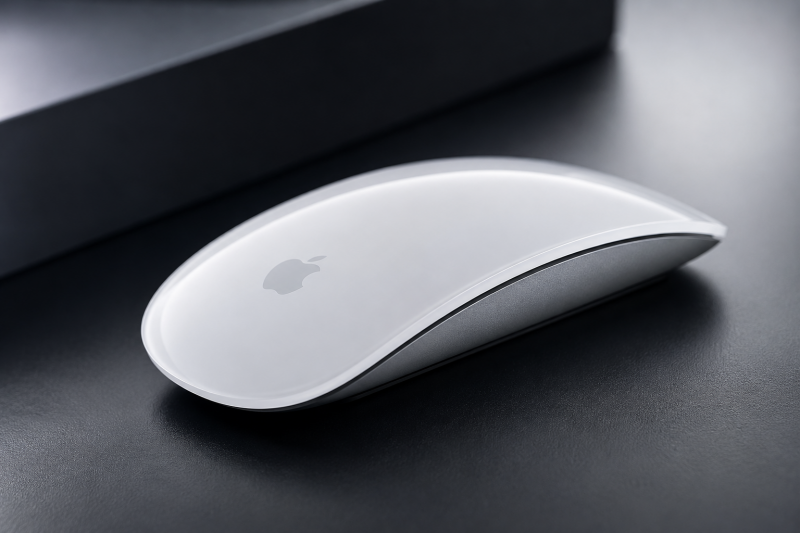
The Magic Mouse retains its signature minimalist design, featuring a sleek aluminium and glass-like surface that looks right at home beside any Mac setup. It's lightweight, compact, and undeniably premium.
However, the low-profile shape may not suit everyone. Users with larger hands or those who spend long hours at their desk may find it less comfortable than more ergonomic alternatives.

Multi-Touch Gestures
One of the Magic Mouse's strongest features is its Multi-Touch surface. Swiping between pages, scrolling through documents, and navigating macOS feels smooth and intuitive.
For Mac users deeply invested in Apple's ecosystem, these gestures remain a significant advantage over many competing mice.
Performance
Tracking is accurate and responsive, making it suitable for everyday productivity, web browsing, and creative work. Pairing is effortless, and integration with macOS is as seamless as ever.
That said, power users and gamers may miss features such as programmable buttons, adjustable DPI settings, or a more ergonomic grip.
Battery Life
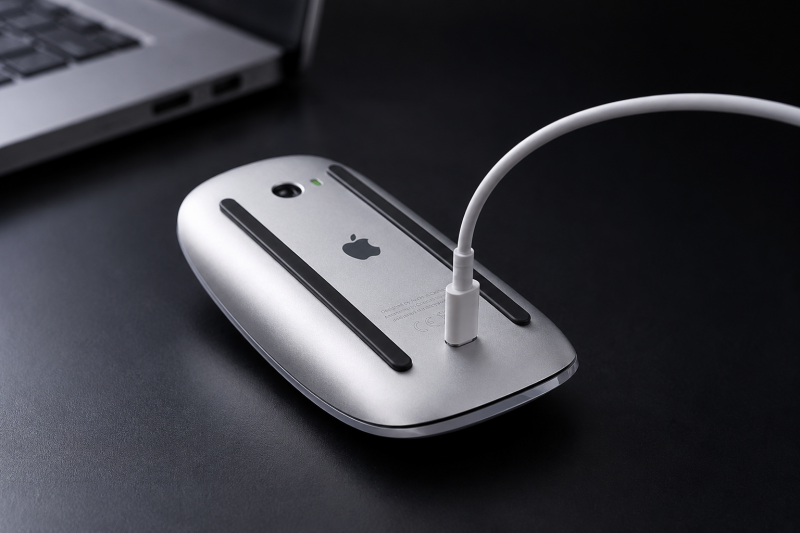
Battery life continues to be excellent, often lasting weeks between charges. The switch to USB-C makes charging more convenient, especially for users who have already moved away from Lightning cables.
The Biggest Complaint
Unfortunately, Apple's most controversial design decision remains unchanged: the charging port is still located on the underside of the mouse. This means the device cannot be used while charging, forcing users to pause work until it has enough power.
While the battery lasts a long time, this design continues to attract criticism from many users.
Verdict
The USB-C Magic Mouse is a welcome update, but it feels more like a refresh than a redesign. If you're already a Magic Mouse user, the new charging standard is a nice improvement. However, those looking for better ergonomics or additional features may find stronger alternatives elsewhere.
The Good:
✔ Premium design
✔ Excellent battery life
✔ Smooth Multi-Touch gestures
✔ Seamless macOS integration
✔ USB-C charging
The bad:
✘ Charging port remains on the underside
✘ Limited ergonomics for extended use
✘ Few customisation options
✘ Premium price tag
Rating: 7.5/10
A stylish and capable mouse for Mac users, but one that still carries the same design compromises years later.
View our latest work
Inside the NHS £10 Billion AI Rollout: Infrastructure Challenges, LLM Safety, and Clinical Reality
The UK government's newly announced £10 billion digital transformation plan for the National Health Service (NHS) represents one of the largest sector-specific deployments of Artificial Intelligence globally. While mainstream headlines focus heavily on the promise of slashed waiting times, the engineering and operational reality of integrating clinical-grade AI into a fragmented, legacy healthcare infrastructure presents severe technical hurdles. This analysis examines the architectural and safety frameworks required to make this rollout viable.
ChatGPT vs Claude vs Gemini: Which AI Is Actually Best for Images, Writing and Coding?
Artificial intelligence has evolved at an astonishing pace over the past two years.
The Ultimate Guide: What to Expect from the iPhone 18 Line-up (Everything We Know So Far)
If you're thinking about upgrading your mobile over the coming months, or if you simply love keeping up with the latest tech gossip, the industry's radar is well and truly locked onto Apple's next generation: the iPhone 18 line-up.
Your Next Laptop Might Not Have an Intel or AMD Processor — Here's Why
For decades, buying a laptop meant choosing between two names: Intel or AMD. Whether you were shopping for a budget notebook, a gaming machine, or a high-end workstation, those companies dominated the market.
The Kindle Scribe: More Than Just an E-Reader